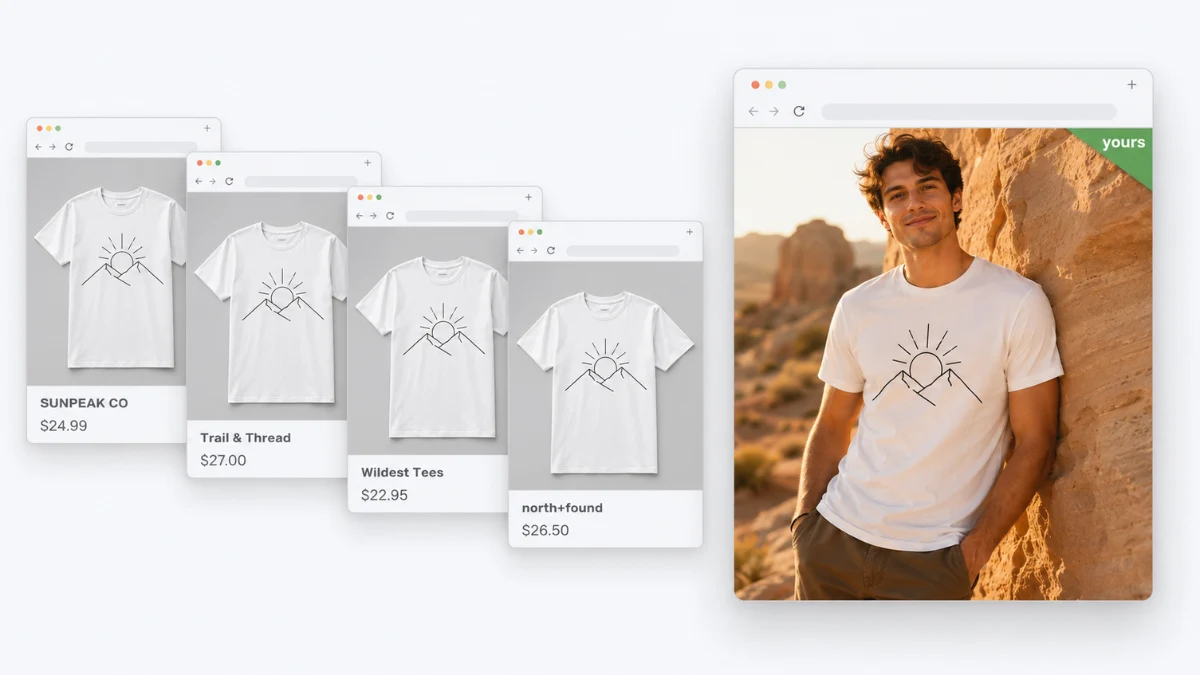
Here’s an uncomfortable experiment: take your best-selling t-shirt design, open your product page next to any random POD store on the internet, and squint. Same blank tee, same invisible model pose, same studio-gray void — because you’re both using the same handful of mockup templates that every print-on-demand platform generates from the same blank-apparel catalog. Your design is different. Nothing else is. And shoppers, who have now seen tens of thousands of these template mockups, have learned to read them instantly: this is a design slapped on a stock photo of a shirt that doesn’t exist yet.
That perception is the invisible tax on every POD sale: it says “we’ll believe it when we see it” at exactly the moment you need the shopper to imagine the real thing. The good news is that the gap between template-looking stores and real-looking brands is now a ladder anyone can climb — four upgrades, in increasing order of impact. Here’s the climb.
Upgrade 1: Get Your Designs Off the Template
The baseline problem: platform mockup generators paste your artwork onto the same flat garment photos every other seller uses. The fix is generating your own product imagery from those mockups: modern AI product photography takes the garment image you already have — including a flat template mockup with your print on it — and renders it worn by a model, with real drape, real light falling across the print, in a setting you choose. The mechanics are the same ones we covered for AI clothing photography without a model: no samples ordered, no photographer, minutes per design.
For a WooCommerce POD store, this runs inside the dashboard — the AnyDress Virtual Photoshoot studio pulls your existing product images and regenerates them on AI models or ghost mannequins. The immediate effect: your tee stops looking like a template, because it isn’t one anymore.
One honest craft note: print fidelity is the thing to check. Your design is the product — after generating, zoom in and confirm the artwork survived accurately (crisp edges, correct colors, no AI-invented details in the print). Generate from your highest-resolution mockup export, and re-run any render that mangles the art. A beautiful model photo with a warped design is worse than the template was.
Upgrade 2: Build a Model Roster, Not a Photo
One good on-model image makes a product page. What makes a brand is consistency: the same recurring faces, the same light, the same visual language across your whole catalog — the thing real clothing labels pay agencies to maintain. With generated imagery this is a decision, not a budget: pick your models once (or upload your own model photos and reuse them), define your backgrounds, and regenerate your catalog to match. A shopper flipping through six products and seeing a coherent world starts treating you like a label. The same roster also quietly solves representation: show every design on multiple body types and skin tones — something POD template libraries have never offered — and watch which version your audience responds to.
Upgrade 3: Put the Design in Its Natural Habitat
Template mockups are context-free by definition — the gray void tells the shopper nothing about who this shirt is for. But your designs have audiences: the plant-mom illustration belongs in a sun-drenched apartment full of monsteras; the gym-humor print belongs mid-workout; the metal-band aesthetic belongs anywhere but a white studio. Scene control is where generated photography beats even real budget photography: describe the setting and the whole catalog moves there. This is also your ad-creative engine — one design rendered in three different scenes for three different audiences is an A/B test that used to require three photoshoots. If you also run supplier-sourced products, this is the same differentiation logic we laid out in dropshipping product photos — POD just starts from a mockup instead of a supplier photo.
Upgrade 4: Answer the Fit Question Nobody Asks Out Loud
POD has a quiet returns problem: most platforms don’t accept returns for sizing (“check the size chart” is the whole policy), which means a wrong-size order doesn’t come back to you — it becomes a customer who never orders again and tells people why. The blank-apparel size charts your platform publishes are accurate but abstract; nobody knows what “Bella+Canvas relaxed fit, 21 inches pit-to-pit” looks like on them.
This is where the last rung of the ladder goes beyond photos entirely: put the real per-size garment measurements on your product page as a proper size chart, and give shoppers a virtual try-on — one uploaded photo, and they see your actual tee, with your actual print, on their own body, with sizing guidance against their measurements. For a purchase that can’t be returned, “see it on yourself first” isn’t a gimmick; it’s the honest version of the transaction. (Why this cuts refund-and-churn so hard is in our returns guide.)
The Ladder, In Practice
A realistic sequence for an existing POD store: this week, regenerate your ten bestsellers on-model (Upgrade 1) and fix any print-fidelity misses. Next, standardize — pick your two or three recurring models and your background language, and roll it across the catalog (Upgrade 2). Then rebuild your top products’ ad creative in audience-matched scenes (Upgrade 3). Finally, add measurements and try-on to the products where sizing complaints or “how does it fit?” questions cluster (Upgrade 4). Each rung compounds the previous one: unique images earn the click, consistency earns the trust, context earns the conversion, and fit certainty earns the repeat customer.
Quick Answers for POD Sellers
Can I keep using Printful/Printify mockups? You can — they’re licensed for exactly that use. The problem isn’t legal, it’s that thousands of stores share them. Treat platform mockups as your source material, not your storefront.
Do I need to order samples to get real photos? For photography, no — AI generation works from the mockup image. Order samples anyway for quality control on your top sellers: you should know what your customer receives, and a sample lets you verify the platform’s print quality matches what your pages promise.
Does AI-generated product imagery need a disclosure? Rules are tightening globally (the EU AI Act among others), and a short “product images AI-generated” note is cheap insurance and increasingly standard. Your design is real and what ships is real — the disclosure covers the model and scene.
Will this work for hoodies, hats, and other POD products? The approach covers wearable garments best — tees, hoodies, sweatshirts, outerwear — plus headwear via size-chart support. Mugs and posters don’t need a fitting room; for those, scene-context images (Upgrade 3) are the relevant rung.
Your design deserves better than the same gray void as everyone else’s. See the Virtual Photoshoot studio for WooCommerce — or if you sell through Instagram or Etsy without a site, get a hosted storefront with try-on built in.