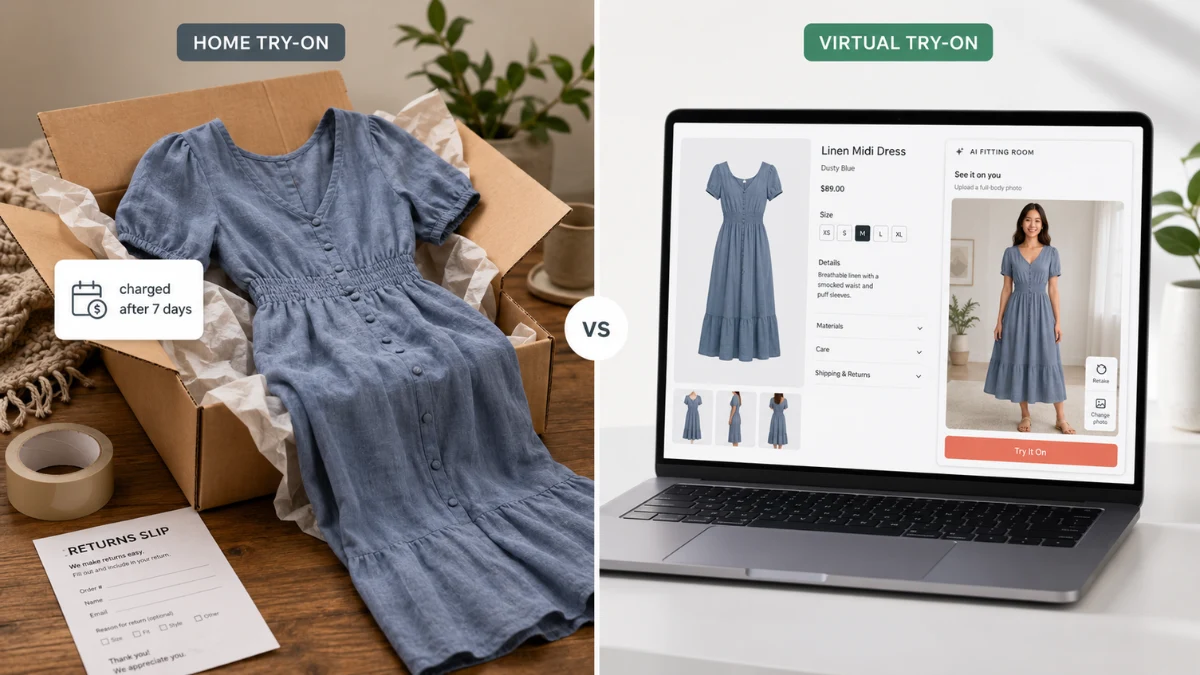
“Try before you buy” is the most persuasive promise in fashion e-commerce — it’s the one thing a physical fitting room has always had over your online store. But when WooCommerce store owners go looking for how to offer it, they find two completely different things wearing the same name: home try-on, where you ship products and only charge for what the customer keeps, and virtual try-on, where the customer sees the product on themselves before ordering at all.
Both are real, both work, and they solve the same problem from opposite ends. This guide explains how each one functions in WooCommerce, what each really costs, and how to decide which fits your store — including why, for most independent clothing stores, one of them is a much safer place to start.
Why Try Before You Buy Exists at All
The fitting room problem is the core economics of online fashion: shoppers can’t feel fabric, judge fit, or see how a garment looks on their own body — so they either don’t buy, or they buy defensively. Defensive buying looks like ordering three sizes to return two (“bracketing”), or ordering with a silent plan to return if it disappoints. Either way, the store eats the cost: clothing return rates run far above other categories, and every return means shipping both ways, inspection, repackaging, and often an unsellable item. (We’ve broken down the full damage in our guide to reducing clothing return rates.)
Try before you buy, in either form, attacks the root cause: uncertainty at the moment of purchase.
Model 1: Home Try-On (Ship Now, Charge Later)
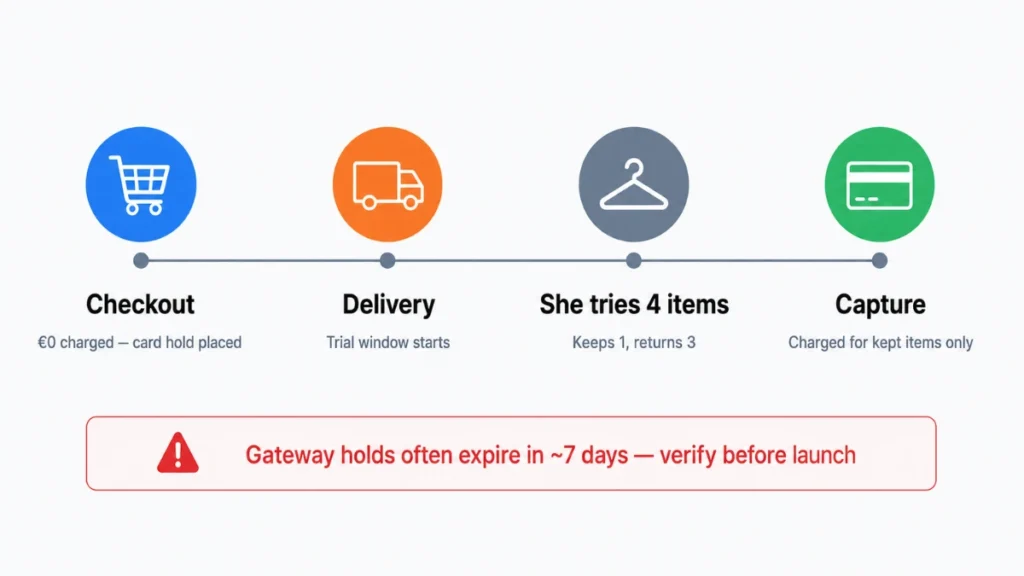
How it works: the customer selects items, checks out with a payment method but is charged nothing (or a deposit); you ship; a trial window starts on delivery — typically 5–14 days; the customer keeps what they like and sends back the rest; you charge their card for the kept items.
In WooCommerce, this is built with plugins that place an authorization hold on the customer’s card at checkout and capture payment when the trial ends. Before choosing one, verify three unglamorous things: that your payment gateway supports long authorization holds (many authorizations expire in about 7 days — shorter than a realistic try-on cycle), that the plugin handles partial capture cleanly (keeping 1 of 4 items), and that it automates the trial-window emails, because chasing “your trial ends tomorrow” messages manually does not scale.
What it wins you: the strongest possible conversion promise (“pay nothing today”), bigger baskets (customers happily take 4–6 items to try), and a premium, Stitch-Fix-like brand feel.
What it costs you — honestly:
- Inventory in limbo. Every shipped box is stock you can’t sell, on trust, for up to two weeks plus return shipping. For a small store, ten open trials can be a meaningful share of working capital.
- Returns become the system, not the exception. Home try-on doesn’t reduce return logistics — it institutionalizes them. You’re building a store where most shipped garments come back by design.
- Fraud and wear risk. Worn-once returns, tag reattachment, and payment methods that fail at capture time are all real, and small stores absorb these hits hardest.
- Margin math. Two-way shipping on every trial box means the model only works with solid margins or high keep-rates.
Home try-on is a genuine strategy — for stores with strong margins, robust ops, and enough capital to float inventory. For a two-person boutique, it’s often a return-rate problem wearing a growth costume.
Model 2: Virtual Try-On (See It on Yourself, Then Buy)
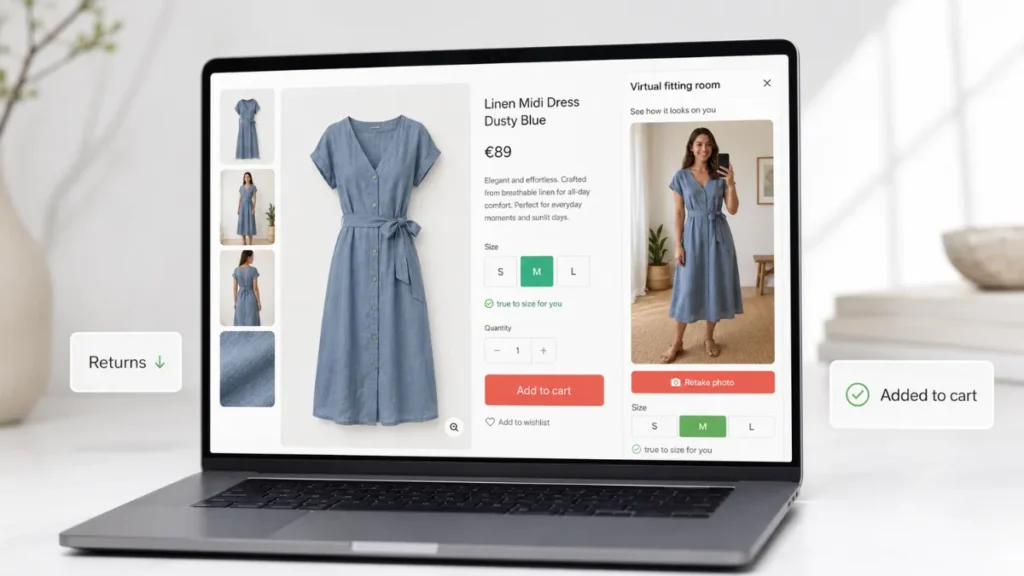
How it works: the shopper opens your product page, taps a “Try It On” button, uploads a photo of themselves, and AI renders the garment on their own body in seconds. Add real garment measurements per size, and the same flow tells them which size fits — before anything ships.
In WooCommerce, this is a plugin install rather than an operational redesign: the AnyDress AI Virtual Try-On plugin adds the try-on button next to Add to Cart, size charts with per-size measurements, and (for store owners) an AI photoshoot studio that generates product imagery from phone photos. Setup is under an hour, works with standard WooCommerce themes, and shoppers’ photos are processed with explicit consent and never stored by the AI engine.
What it wins you: the confidence effect of try-before-you-buy — the shopper has seen it on herself — without shipping a single speculative box. Bracketing drops because sizing is answered up front. Nothing sits in limbo; you charge at checkout like a normal store. And the try-on images themselves get shared to Stories and group chats, which is marketing you didn’t pay for.
What it doesn’t do — honestly: the customer still can’t feel the fabric or physically wear the piece, so it won’t fully replace the tactile reassurance of home try-on for premium price points. And render quality matters — a poor virtual try-on hurts trust more than none at all, which is why you should test any solution on your own products before going live.
Head to Head
| Home try-on | Virtual try-on | |
|---|---|---|
| Upfront promise | “Pay nothing today” | “See it on yourself first” |
| Setup effort | Payment holds, trial logic, ops redesign | Plugin install, ~1 hour |
| Working capital risk | High — stock ships on trust | None |
| Effect on returns | Returns become the default flow | Returns drop at the source |
| Fraud exposure | Real (wear-and-return, failed captures) | None |
| Fabric feel | Yes | No |
| Fits small stores | Rarely | Yes |
Which One Should Your Store Choose?
A practical rule: start with virtual try-on; earn your way into home try-on. Virtual try-on removes most of the uncertainty that makes shoppers hesitate, at plugin-install cost, with zero new operational risk. If your data later shows a segment of high-value customers who’d convert with a physical trial — premium pieces, loyal repeat buyers with proven keep-rates — layer a limited home try-on program on top for that segment, rather than making unpaid shipping your default checkout.
The two models also stack: a shopper who has virtually tried a piece and checked her measurements is a far better home-try-on candidate — her keep-rate will be higher because the guesswork was already done on screen.
FAQ: Try Before You Buy in WooCommerce
Does WooCommerce support try before you buy natively? No — core WooCommerce charges at checkout. Both models require a plugin: payment-hold plugins for home try-on, or a virtual try-on plugin like AnyDress for the on-screen version.
Is virtual try-on accurate enough to reduce returns? Modern AI try-on renders the actual garment on the shopper’s own photo, and paired with real per-size measurements it addresses both top return causes: wrong size and “looked different than expected.” Test it on your own catalog — accuracy on your garments, not a demo, is what matters.
Can I offer try before you buy without a website? Yes — sellers on Instagram or TikTok without their own store can use a hosted try-on storefront instead. See our pages for Instagram sellers and TikTok sellers.
Does home try-on work with any payment gateway? No — it depends on authorization-hold length and partial-capture support, which vary by gateway and country. Verify with your gateway before committing to the model.
Does virtual try-on work for products other than clothes? Yes — the same approach covers eyewear, headwear, swimwear, and outerwear; see our guide to virtual try-on for glasses in WooCommerce.
Want the fitting room without the shipping risk? See how AI virtual try-on works in WooCommerce — or add the plugin to your store today.