Booking a model costs money before a single frame is captured. Add the studio rental, the photographer’s day rate, lighting crew, a wardrobe stylist, and three to five days of post-production editing, and a single catalog refresh can run your clothing business anywhere from $3,000 to $15,000 per shoot day. For an independent WooCommerce store managing a seasonal catalog of 200 SKUs, that number is not a line item — it is a business constraint.
In 2026, a structural alternative has arrived. Generative AI is now capable of producing on-model fashion photography directly from a product flatlay or ghost mannequin image, delivering professional catalog visuals at a fraction of the cost, in a fraction of the time, without booking a single model. The question for online clothing store owners is no longer whether this technology works. It is whether they can afford to keep ignoring it.
The Economics of Traditional Model Photography No Longer Add Up
Traditional product photography costs scale in every direction that hurts a growing store. Studio time is charged by the day. Models are hired by the hour. If your product line expands by 50 items next season, every new SKU adds to the shoot schedule. If you want to test a different background, lifestyle setting, or seasonal context for an ad campaign, you book another shoot.
According to research published in April 2026, the average fashion e-commerce brand spends $50 to $200 per hero product image when all costs — studio fees, model fees, photographer rates, styling, and post-production — are factored in. For a 300-SKU catalog, that is between $15,000 and $60,000 per cycle.
Operational realities compound the problem:
– Lead time. Coordinating a model shoot takes three to fourteen days from scheduling to delivered, edited images. New products cannot be listed until photography is complete.
– Rigidity. If the images need updating — for a sale, a seasonal background refresh, an international ad variant — you restart the entire process.
– Scale ceiling. A growing catalog requires proportionally more shoots. The cost structure does not improve with scale; it worsens.
For enterprise brands, these costs are absorbed. For independent and mid-market WooCommerce clothing stores, they represent a structural barrier to looking competitive.
What Generative AI Fashion Photography Actually Does
AI fashion photography tools take a standard product image — a ghost mannequin shot, a flatlay, or even a product photo on a plain background — and generate a finished, on-model result. The AI places the garment on a realistic human figure, applies accurate fabric physics, adjusts lighting, and outputs a catalog-ready photograph.
The category has matured significantly. Earlier implementations produced results that were visually plausible but failed at the details fashion brands require: accurate drape on structured fabrics, realistic texture rendering, and consistent silhouette across varied garment types. In 2026, that gap has largely closed. According to industry data, over 60% of fashion e-commerce brands now use at least one AI tool in content production, up from 35% in 2024, with reported photography cost reductions of up to 90%.
The output capabilities now include:
– On-model imagery across diverse body types, skin tones, ethnicities, and poses
– Ghost mannequin generation for brands that prefer the invisible-mannequin presentation style
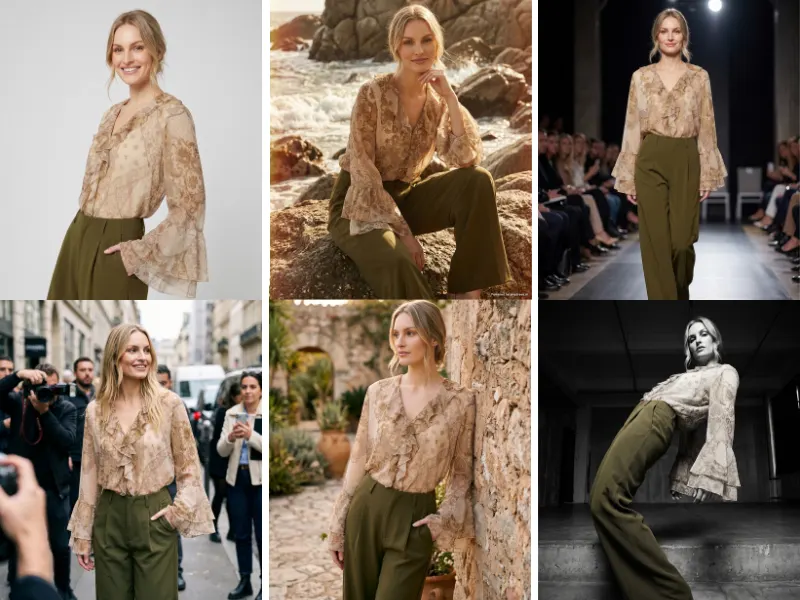
– Background generation and replacement — swap a white studio background for a Paris street scene or a Tuscany vineyard via text prompt
– Multi-angle generation — front, back, and side views from a single source image
– Editorial and lifestyle style variants — adapting the same product image to street style, editorial, vintage, or commercial aesthetics
The business implication is direct: a new product added to a WooCommerce catalog can have a complete professional image set — multiple models, multiple angles, multiple background contexts — within hours of inventory arriving, not weeks after a shoot is scheduled and delivered.
The Real Cost Comparison: A WooCommerce Store Scenario
Consider a WooCommerce clothing store with 400 active SKUs that runs two catalog refreshes per year.
Traditional model photography:
– Photography sessions: 2 × $8,000 (studio, photographer, model, styling, editing) = $16,000/year
– Additional seasonal ad variants: 4 × $2,000 = $8,000/year
– Total annual photography spend: ~$24,000
– Lead time per refresh: 10–14 days
AI fashion photography:
– Monthly tool subscription at scale: $599/month (AnyDress.ai Growth Store tier) = $7,188/year
– Unlimited catalog refreshes, seasonal backgrounds, and ad variants within the same subscription
– Lead time per product: hours, not days
– Total annual AI photography spend: ~$7,200
The savings are significant. But the strategic advantage is arguably more valuable than the cost reduction. A store operating on AI-generated photography can test five different background contexts for a new dress before deciding which performs best. It can update its entire winter catalog with a summer backdrop for a June sale — overnight. It can add 30 new products per week to its live catalog without a shoot bottleneck.
Why WooCommerce Store Owners Are the Primary Beneficiaries
Enterprise fashion brands have long had dedicated creative teams and photography budgets that, while large, were manageable as a percentage of revenue. The democratizing effect of AI photography is most pronounced at the independent and mid-market level — precisely where the majority of WooCommerce clothing stores operate.
The competitive gap has been visual. An independent boutique selling contemporary women’s fashion competes for the same search real estate as established brands. Professional, on-model product photography has always been the clearest visible signal of legitimacy and brand quality. Shoppers who land on a product page with flat, poorly lit images leave. Shoppers who land on a page with polished, on-model images stay, engage, and convert.
Research consistently supports the link between image quality and purchasing behavior. Professional product imagery improves e-commerce conversion rates by 30 to 40 percent compared to amateur photography. For fashion specifically — where the garment’s fit, drape, and styling on a real human form are the primary purchase drivers — on-model photography is not optional. It is the product page.
AI fashion photography removes the financial barrier that previously made professional on-model imagery inaccessible for stores operating below the enterprise level.
The Virtual Try-On Layer: From Catalog Photos to Active Conversion Tool
Replacing model shoots with AI-generated catalog photography solves the supply-side problem: producing professional images at scale and low cost. A parallel development solves the demand-side problem: giving shoppers the ability to see the garment on their own body before they commit to a purchase.
This is where AI-powered virtual try-on operates as a fundamentally different type of tool.
Rather than replacing a photographer, virtual try-on replaces the uncertainty that drives online clothing returns. The U.S. National Retail Federation reported that online fashion return rates reached 19.3% of all online sales in 2025, totaling $849.9 billion in returned merchandise. For fashion specifically, the return rate is higher. The primary driver, consistently, is fit uncertainty — the buyer could not be confident the item would look or fit as expected.
Generative AI virtual try-on addresses this directly. Shoppers upload a face or body photo and see themselves wearing the specific garment from a store’s catalog. The psychological shift from “imagining” to “knowing” measurably changes purchasing behavior:
– Shoppers who engage with AI virtual try-on features convert at up to 35% higher rates than non-users on the same product pages
– Brands implementing the technology are reporting return reductions of 15 to 35%
– Users who engage with try-on even once demonstrate up to 7x higher retention compared to shoppers who never interact with the feature
For a WooCommerce clothing store, the compounding effect is substantial: AI-generated catalog photography produces the professional imagery that brings buyers to the product page, and virtual try-on converts those buyers at a meaningfully higher rate while reducing the cost and operational burden of returns.
Outfit image courtesy of erya.gr
How AI Fashion Photography Works Inside WooCommerce
The practical workflow for a WooCommerce store adopting AI fashion photography looks markedly different from traditional photography logistics.
Traditional workflow:
1. Receive new inventory
2. Coordinate shoot date, studio, model, photographer, stylist
3. Wait 3–14 days for edited images
4. Upload to WooCommerce media library
5. Attach to product gallery
6. Publish product listing
AI-powered workflow:
1. Receive new inventory
2. Photograph flatlay or ghost mannequin image in-house
3. Upload to AI tool inside WP Admin dashboard
4. Select model type, background, pose, and photography style
5. Generate images — front, back, side — within minutes
6. 1-click save to WP Media Library and attach to WooCommerce product gallery
7. Publish product listing
The entire process from raw product photo to live WooCommerce listing can be completed in under an hour. For stores adding new products regularly, this operational difference compounds into a meaningful competitive advantage: faster time-to-market, more current catalog imagery, and the ability to respond to trends without a shoot scheduling dependency.
Addressing the Quality Objection
The most common hesitation among store owners who have investigated AI fashion photography is quality. The concern is legitimate and was well-founded in earlier iterations of the technology. AI-generated clothing images from 2022 and 2023 frequently produced distorted hands, incorrect fabric textures, and uncanny visual artifacts that were immediately identifiable.
In 2026, the gap between AI-generated and studio-produced fashion photography has narrowed to the point where it is imperceptible for the majority of catalog applications. Industry observers note that AI tools now handle:
– Fabric physics — how silk drapes versus how denim structures itself — with accuracy that reflects real-world material behavior
– Garment integrity — maintaining the correct silhouette, pattern alignment, and structural details across different model poses
– Diverse representation — generating on-model images across a wide range of body types, skin tones, and ages without the cost and logistics of casting a diverse model roster
The honest qualifier: AI photography still yields to professional studio work for hero images of luxury goods, products where precise texture and material fidelity are the primary purchase driver (fine jewelry, leather goods), and flagship campaign imagery where brand identity requires exact creative control. The recommended approach for most WooCommerce clothing stores is a hybrid model — AI for the 70 to 80 percent of catalog photography that requires professional quality at scale, and selective professional shoots for hero product pages where the investment is justified by the margin.
The Privacy and Ethics Dimension for Shopper-Facing AI
For WooCommerce store owners implementing the consumer-facing virtual try-on layer — where shoppers upload personal photos — data handling is a legal and reputational concern that cannot be ignored.
Shopper-uploaded body images qualify as biometric data in many jurisdictions and are subject to GDPR in Europe, BIPA in Illinois, and an expanding set of state-level privacy laws in the United States. The question store owners must ask of any virtual try-on provider is not just whether the images produce good results, but how those images are processed, stored, and deleted.
Best-practice standards in 2026 include:
- No AI training on shopper photos — uploaded images should never be used to train or improve AI models
- In-memory processing — images should be processed in secure server RAM and destroyed immediately after generation, with no disk storage
- Automatic deletion schedules — any temporary image files stored on the WP server should be permanently deleted via automated background processes within a defined, short window
- Explicit no-training policy — available in writing in the provider’s terms of service
For GDPR-compliant WooCommerce stores operating in or selling to the European market, these are not optional considerations. They are legal prerequisites. Choosing a virtual try-on provider that meets these standards protects the store owner from liability and provides shoppers with the assurance that their personal images are handled responsibly — a trust signal that directly supports conversion.
The Practical Decision for WooCommerce Clothing Store Owners in 2026
The market has moved. Over 60% of fashion e-commerce brands are already using AI in content production. The adoption curve is compressing because the technology has crossed the quality threshold required for professional catalog use, and the cost differential has become impossible to rationalize against traditional photography.
For WooCommerce clothing store owners still relying exclusively on traditional model shoots, the position is increasingly difficult to sustain:
- The cost of professional photography is not declining
- Competitors adopting AI photography are achieving faster catalog velocity and lower per-image costs
- Consumer expectations for on-model imagery, diverse representation, and visual interactivity (virtual try-on) are rising
- The operational bottleneck of shoot scheduling constrains how quickly new products reach market
The decision is not whether to adopt AI fashion photography. It is which implementation serves the store’s specific catalog, production workflow, and customer experience goals.
Start Without the Studio: AnyDress.ai for WooCommerce
AnyDress.ai is built specifically for this transition, as a native WooCommerce plugin that brings both AI fashion photography and consumer-facing virtual try-on into the same WordPress environment your store already runs on.
The backend studio (for merchants) operates entirely inside the WP Admin dashboard. Upload a flatlay or ghost mannequin image, select from existing AI models, upload brand-specific models, or generate random AI models. Adjust the pose — front, back, or side. Apply a background via text prompt using the Magic Scene feature, or choose from editorial, street, vintage, and commercial photography styles. Save directly to the WP Media Library and attach to your WooCommerce product galleries in a single click.
The frontend try-on widget (for shoppers) adds a customizable “Try It On” button directly next to your Add to Cart button. Shoppers upload a photo once and can try on any garment across your store. No account required. No app download. The conversion data on this feature is consistent across the industry: shoppers who use it buy at significantly higher rates and return items less frequently.
On privacy: AnyDress.ai processes shopper images in secure server memory and destroys them immediately after generation. No shopper photo is ever used to train AI models. A background cron job permanently deletes any temporary files from the WP server after seven days. The implementation is designed to meet GDPR standards from the ground up.
Plans start at a 3-day free trial with 20 included credits — enough to generate a meaningful sample of AI catalog images for your actual products before committing to a subscription.
The era of booking a studio every time your catalog grows is ending. The tools to replace it are available, proven, and built for the WooCommerce environment you already own.