The WooCommerce vs. Shopify debate has been running for a decade. In 2026, most platform comparison articles still frame it the same way: cost, ease of use, customization, SEO. Those are valid dimensions, and this article covers them honestly.
But for clothing store owners specifically, there is a dimension that most comparisons ignore entirely — and it is the one that is reshaping how fashion e-commerce competes: AI tool integration.
Not which platform has more apps. Not which has a flashier AI marketing feature. The specific question of which platform allows a clothing store to deploy AI virtual try-on for shoppers and AI-powered product photography in the same native workflow — without building a custom integration, without relying on a third-party SaaS that can change pricing or shut down, and without exporting your data to systems you do not control.
That question has a clear answer in 2026. But to get there properly, the full platform comparison matters first.

The Core Architectural Difference
Every WooCommerce vs. Shopify decision comes back to a single foundational choice: managed utility versus customizable architecture.
Shopify is a fully hosted SaaS platform. You pay a monthly subscription and Shopify handles the server infrastructure, security patches, PCI compliance, CDN performance, and uptime. You do not own the code, but you never have to manage the plumbing either. For most merchants, that trade-off is the right one.
WooCommerce is an open-source plugin built on WordPress. You host it yourself, manage the database, apply updates, configure security, and own 100% of the code. That ownership gives you unlimited flexibility — and unlimited responsibility.
Neither is objectively superior. The correct choice depends on your technical resources, your customization requirements, and — increasingly in 2026 — the specific AI tools you intend to build your store around.
Ease of Use: Shopify Wins for Non-Technical Operators
Shopify was designed from the ground up as a standalone e-commerce platform. The admin interface is clean, the product management workflow is intuitive, and most daily operations — updating products, managing orders, running promotions — can be handled by a non-technical team member without developer support.
WooCommerce requires comfort with WordPress. Getting a store operational involves configuring hosting, installing and managing plugins, navigating the WordPress admin layer, and handling updates across an ecosystem of interdependent components. For a non-technical founder running a clothing boutique without an in-house developer, WooCommerce carries real operational overhead that Shopify does not.
For ease of use: Shopify.
Customization and Flexibility: WooCommerce Wins for Complex Builds
WooCommerce’s open-source architecture is its most powerful attribute. Because you have full access to the code, developers can build virtually anything: complex pricing logic, custom workflow integrations, deeply customized product configurators, multi-vendor marketplaces, or bespoke checkout flows tied to legacy business systems.
Shopify is a closed platform. Its app marketplace is large and well-vetted, covering the needs of the vast majority of stores. But you operate within boundaries Shopify sets. If your requirement falls outside what a Shopify app supports, you are building a custom private app via the Shopify API — a more expensive path that still operates within Shopify’s constraints.
For clothing stores with standard operations, Shopify’s boundaries are rarely limiting. For stores with genuinely complex requirements, WooCommerce’s flexibility is decisive.
For customization: WooCommerce.
Total Cost of Ownership: More Nuanced Than It Appears
WooCommerce is free to install. Shopify starts at $39 per month. On the surface, WooCommerce looks cheaper. The full picture is more complex.
A production-grade WooCommerce store requires:
- Managed hosting: €50–€500/month for enterprise-level performance and uptime
- Security and backup tooling: €30–€100/month for firewall, malware scanning, and off-site backups
- Plugin licenses: €20–€150/month for advanced features (subscriptions, multilingual support, etc.)
- Developer retainer: €500–€2,000/month for routine updates, bug fixes, and security patches
A performance-comparable WooCommerce store frequently has a higher monthly run rate than a mid-tier Shopify plan. The key difference is predictability. Shopify’s costs are structured and subscription-based. WooCommerce’s costs include the unpredictable: the emergency developer call when a WordPress core update breaks your checkout mid-campaign.
| Expense Category | Shopify (Mid-Market) | WooCommerce (Mid-Market) |
|---|---|---|
| Monthly platform fee | €39 – €399 | €0 |
| Managed hosting | Included | €100 – €500 |
| SSL / security / PCI | Included | €20 – €100 |
| Core maintenance | Included | €500 – €1,500 |
| App / plugin licenses | €50 – €200 | €50 – €150 |
| Transaction fees | 0% (Shopify Payments) | 0% (processor fees apply) |
| Developer dependency | Low to moderate | High |
For most clothing boutiques without in-house technical staff, Shopify’s all-in pricing is more financially predictable and often lower in total than a properly maintained WooCommerce stack.
For cost predictability: Shopify. For raw flexibility at enterprise scale with a dedicated dev team: WooCommerce.
SEO and Content: WooCommerce Has a Structural Edge
WooCommerce is built on WordPress — the world’s most powerful content management system. For clothing stores whose primary acquisition strategy is content marketing and organic search, this matters.
WordPress gives you granular control over URL structures, category hierarchies, metadata, schema markup, and internal linking architecture. Tools like Yoast SEO and RankMath provide a depth of technical SEO control that Shopify’s native tools do not fully match.
Shopify’s SEO has improved substantially in recent years. It handles the fundamentals well and prevents most common mistakes through opinionated defaults (fixed /products/ and /collections/ URL patterns, for example). For the majority of clothing stores, Shopify’s SEO ceiling is more than sufficient to rank competitively.
But for stores building authority through long-form editorial content — detailed buying guides, trend reports, style education — WordPress’s content infrastructure provides a more flexible foundation.
For content-heavy SEO strategies: WooCommerce. For standard e-commerce SEO: both are sufficient.
Payment Processing: WooCommerce Offers More Flexibility
WooCommerce does not impose a payment processor. You connect whichever provider you choose — Stripe, PayPal, local acquirers, high-risk processors — at no platform-level surcharge.
Shopify has its own payment system, Shopify Payments, which is seamlessly integrated and includes Shop Pay, a one-click checkout that stores card details across the Shopify ecosystem. If you use a third-party processor instead, Shopify adds a 0.6% to 2% transaction surcharge on top of your standard processing fees, depending on your plan tier.
For clothing stores selling mainstream categories with standard payment needs, Shopify Payments is the faster, more integrated path. For stores with specific processing requirements — high-risk product categories, preferred regional acquirers, custom billing logic — WooCommerce’s flexibility is a meaningful operational advantage.
For payment flexibility: WooCommerce. For frictionless setup: Shopify.
The Dimension Every Clothing Store Comparison Misses: AI Tool Integration in 2026
This is where the platform debate becomes specifically relevant to fashion merchants — and where the standard Shopify vs. WooCommerce narrative falls short.
The AI fashion tools market is growing at 32% annually. In 2026, the two highest-impact categories for clothing store operators are:
- Frontend virtual try-on — giving shoppers an interactive, on-site experience to see themselves in garments before purchasing
- Backend AI photography — generating professional on-model catalog images without traditional photoshoot costs
Both of these capabilities affect the metrics that determine store profitability: conversion rate, return rate, cost per catalog image, and time-to-market for new collections.
The critical question for platform selection is: which platform allows you to deploy both of these capabilities natively, within your store infrastructure, without a disjointed third-party SaaS dependency?
The Shopify App Store Approach: Capable, But Structurally Fragmented
Shopify’s app marketplace lists virtual try-on and AI photography tools. They install via the Shopify App Store, add charges to your monthly billing, and operate as external services that connect to your product catalog via API.
For the merchant, this means:
- Generated images must be downloaded from the external tool and manually uploaded to Shopify’s media library
- The try-on experience redirects shoppers to or through a third-party widget that operates outside Shopify’s native storefront code
- Usage data, shopper photo processing, and generated assets are managed on third-party servers subject to that vendor’s data policies
- If a tool changes its pricing, limits its feature set, or shuts down, your store loses the capability with limited notice
These are not hypothetical risks. The fashion AI tool landscape has already seen significant consolidation and discontinuation in 2025–2026. Google’s Doppl app — which many merchants had evaluated as part of their AI strategy — was shut down without warning on April 30, 2026.
The WooCommerce Advantage: Natively Integrated AI Fashion Tools
WooCommerce’s open-source architecture allows plugins to operate as genuine extensions of your store infrastructure — not as external SaaS services bolted onto your product pages. For fashion merchants specifically, this distinction matters enormously when deploying AI tools.
AnyDress.ai is the clearest example of what native WooCommerce AI integration looks like in practice. It is not a standalone service that connects to WooCommerce. It is a WooCommerce plugin — installed through your WordPress admin, operating within your existing store infrastructure, with generated assets written directly to your WordPress Media Library and product galleries.
What Native WooCommerce AI Integration Looks Like in Practice
AnyDress.ai operates on a dual-engine architecture that addresses both sides of the fashion e-commerce AI equation simultaneously — a capability no Shopify app currently replicates in a single, natively integrated tool.
The Backend: AI Photoshoot Studio Inside Your WP Admin
From within your WordPress dashboard, AnyDress.ai gives you a complete product photography studio. Upload a flat-lay or ghost mannequin image of any garment and generate professional on-model catalog imagery with full control over:
- Model selection — choose from a library of AI models, upload branded references, or generate randomized models
- Pose variety — front, back, and side views from a single source image
- Photography styles — Editorial, Street, Vintage, Studio, and more
- Background control — change scenes via text prompt using the Magic Scene feature
- Direct WP sync — generated images save to your WordPress Media Library and attach to your WooCommerce product gallery in one click
There is no download-and-upload cycle. No external dashboard to log into. The image moves from generation to product gallery entirely within WordPress.
The Frontend: Virtual Try-On Embedded on Your Product Pages
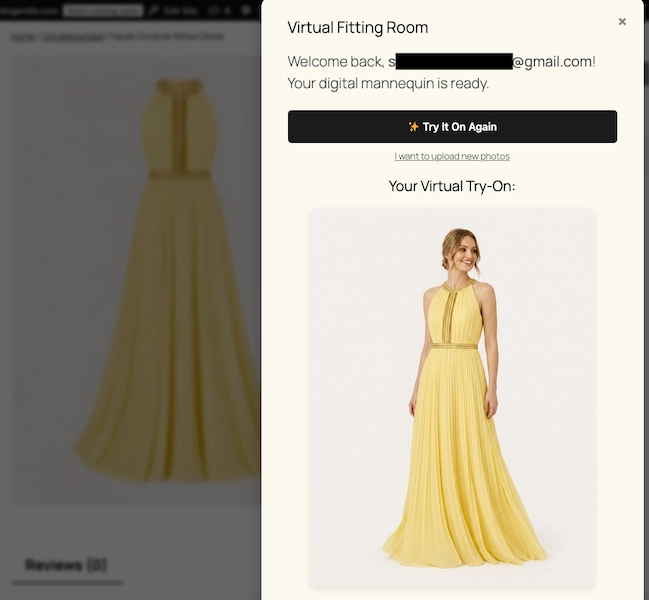
On every WooCommerce product listing, AnyDress.ai adds a customizable “Try It On” button alongside Add to Cart. Shoppers upload a photo once and try on garments across your entire store without re-uploading — no app to download, no third-party redirect, no account creation on an external platform.
The shopper experience is native to your store. The conversion lift is attributed to your store. The data stays in your infrastructure.
This dual capability — backend studio plus frontend try-on in one native WooCommerce plugin — does not exist in the Shopify ecosystem. Shopify merchants deploying AI photography and virtual try-on must use separate tools, manage separate dashboards, coordinate separate billing relationships, and accept that shopper data flows through multiple third-party systems outside their control.
Data Privacy: A Critical Differentiator for Fashion AI Tools
When shoppers upload personal photos to try on garments, data handling becomes a compliance consideration — particularly for stores serving EU customers under GDPR.
Shopify-connected AI try-on tools process shopper images on third-party servers. Data retention and AI training policies vary by vendor. Several platforms retain user-uploaded images to improve their AI models unless the user actively opts out.
AnyDress.ai applies a structurally different standard by design:
- Shopper photos are never used to train AI models
- Images are processed in secure server RAM and destroyed immediately after generation
- A background cron job permanently deletes all user photos from your WordPress server after 7 days
- No image data is transferred to or retained by a third-party platform
For WooCommerce clothing stores operating under GDPR — or those who simply prioritize customer trust as a brand value — this is not a marginal feature. It is a foundational requirement for responsible deployment of any virtual try-on capability.
Shopify’s App Store does not and cannot guarantee these standards across its third-party AI tool vendors. WooCommerce’s self-hosted architecture, combined with a privacy-first plugin like AnyDress.ai, puts full control over shopper data within your own infrastructure.
Garment Compatibility: Why It Matters for Your Catalog
Not all AI fashion tools handle all garment types equally. Many virtual try-on and AI photography platforms perform reliably on dresses and tops but produce inconsistent or unusable results on pants, structured outerwear, or footwear — forcing stores to maintain parallel workflows for categories the AI cannot handle.
AnyDress.ai covers the full range of clothing categories a WooCommerce store typically carries:
- Dresses and skirts
- Tops, blouses, and shirts
- Pants and trousers
- Outerwear and jackets
- Hats and headwear
- Footwear
For a clothing store with a diverse catalog, this universal compatibility means a single plugin covers your entire product range — no carve-outs, no hybrid workflows, no categories left on flat-lay because the AI could not handle them.
Platform Verdict: Which Is Better for Clothing Stores in 2026?
There is no single correct answer for every clothing store. The right platform depends on your technical resources, business model, and — in 2026 — the specific AI capabilities you intend to build your store around. Here is the honest breakdown:
| Factor | Shopify | WooCommerce |
|---|---|---|
| Ease of use | Better for non-technical teams | Requires technical comfort |
| Cost predictability | Structured, subscription-based | Variable — can exceed Shopify at scale |
| Customization ceiling | Limited by platform boundaries | Unlimited with developer resources |
| SEO for content-heavy stores | Sufficient for most | Superior for long-form/editorial |
| Payment processing flexibility | Best with Shopify Payments | Full freedom, no platform surcharges |
| AI fashion photography | Third-party SaaS, manual sync | Native WP Admin studio, 1-click sync |
| AI virtual try-on | Third-party widget, external data | Embedded on product pages, in-store data |
| Dual AI capability (both in one plugin) | Not available | Yes — AnyDress.ai |
| Shopper data privacy | Vendor-dependent | Self-hosted, GDPR-ready by design |
| Platform dependency risk | High (Shopify controls the roadmap) | Low (you own the code) |
Choose Shopify if: You are launching your first clothing store, you have no in-house technical resources, you want fully managed infrastructure, and your AI tool requirements are basic or you are comfortable with disconnected third-party apps managing your shopper data.
Choose WooCommerce if: You want full ownership and control of your store infrastructure, you intend to deploy native AI fashion tools that integrate directly with your product catalog and operate within your own data environment, and you have access to developer resources for setup and maintenance.
For clothing store owners who are serious about AI-powered growth in 2026 — specifically the combination of professional AI catalog photography and on-site virtual try-on as a conversion and retention strategy — WooCommerce is the superior platform. Not because Shopify lacks AI apps, but because WooCommerce allows those capabilities to operate natively within your store, under your control, with your data handled to the standard your customers and regulators expect.
The AnyDress.ai Advantage for WooCommerce Clothing Stores
AnyDress.ai is purpose-built for WooCommerce clothing merchants who want enterprise-grade AI fashion capabilities without enterprise-level complexity or cost.
Pricing plans:
| Plan | Price | Credits/Month |
|---|---|---|
| Mini Drop | €99/mo | 50 credits |
| Boutique Starter | €299/mo | 250 credits |
| Growth Store | €599/mo | 750 credits (no watermark) |
| High-Volume Pro | €999/mo | 1,500 credits (no watermark) |
Annual billing is available at a reduced rate across all plans.
Installation takes minutes through your WordPress admin. The backend photoshoot studio becomes available immediately. The Try It On button is live on your product pages the same day. Every new installation includes a 3-Day Free Trial with 20 free credits — enough to generate real product imagery and run live virtual try-ons before committing to a plan. No credit card required.
The Bottom Line
Shopify and WooCommerce are both capable platforms for clothing stores. Shopify wins on simplicity and managed infrastructure. WooCommerce wins on ownership, flexibility, and — critically for fashion merchants in 2026 — native AI tool integration.
The question of which platform is better for your clothing store is ultimately a question of what kind of competitive advantage you intend to build. If that advantage includes giving every shopper a live virtual try-on experience on your product pages, generating professional on-model catalog photography for your entire range at a fraction of traditional costs, and owning that capability entirely within your own WordPress infrastructure — the answer is WooCommerce, with AnyDress.ai.
Start your 3-Day Free Trial today at anydress.ai. Twenty free credits. No credit card required.